
How to Appeal a Google Business Profile Suspension (2026 Step-by-Step)
A suspended Google Business Profile, fixed properly. Find the trigger, fix the live listing, and submit one strong appeal. Step-by-step, no guesswork.
A suspended Google Business Profile disappears from Maps and Search. The calls slow down, the map visibility goes, and you usually hear about it from a customer before you hear it from Google. Getting it back is not luck, and it is not about knowing someone at Google. It is a process: work out which rule you tripped, fix it on the live profile, then submit one strong, evidence-backed appeal through Google’s official appeals tool.
This walks through that process in the order it needs to happen, including what to do if the first appeal comes back denied.
Google Business Profile appeal, in one paragraph. A Google Business Profile appeal is the request you submit through Google’s official appeals tool to reinstate a suspended or disabled profile. You work out which policy the listing tripped, fix it on the live profile, attach evidence that matches the profile exactly, then submit the appeal once. If it comes back denied, you request an additional review, not a second profile.
TL;DR, appealing a Google Business Profile suspension:
- Work out whether it is a profile suspension or a whole-account restriction. They are fixed in different places, in a set order.
- Audit and fix the live profile before you appeal. Google reviews the listing as it stands, not as you promise it will be.
- Gather current evidence that matches the profile exactly.
- Submit one strong appeal through the official appeals tool. Since July 2026 you attach your evidence inside the appeal form, and it can only be submitted once, so prepare first.
- If denied, request an additional review with stronger evidence. Do not spin up a second profile.
What is a Google Business Profile appeal?
A Google Business Profile appeal is the formal channel for getting a suspended or disabled profile back online. Google shows the broad restriction reason, you fix the cause on the live listing, then you use the official appeals tool to submit your case with evidence that the business is legitimate and located where the profile says.
There are two rounds available to most owners: the first appeal, and, if that is rejected, an additional review. After both, direct appeals close and the realistic path is escalation through a Google Business Profile Product Expert in the official help community.
First: is it a profile suspension or an account restriction?
Before you appeal, work out which of two things has actually happened, because they are fixed in a set order.
Think of your Google Account as the master login, and each Business Profile as one listing that login manages.
- A profile suspension means Google has pulled a single listing. The account still works and your other listings are fine.
- An account restriction means Google has limited the master login itself, which can take every listing attached to it offline at once.
If it is an account restriction, fix that first. Go to your Google Account, open the restrictions section, and clear the account-level issue before you touch the profile appeal. Appealing a single listing while the whole account is still restricted is wasted effort, because the block sits above the listing. Once the account is clean, move on to the profile appeal.
Why your profile was suspended (find it before you appeal)
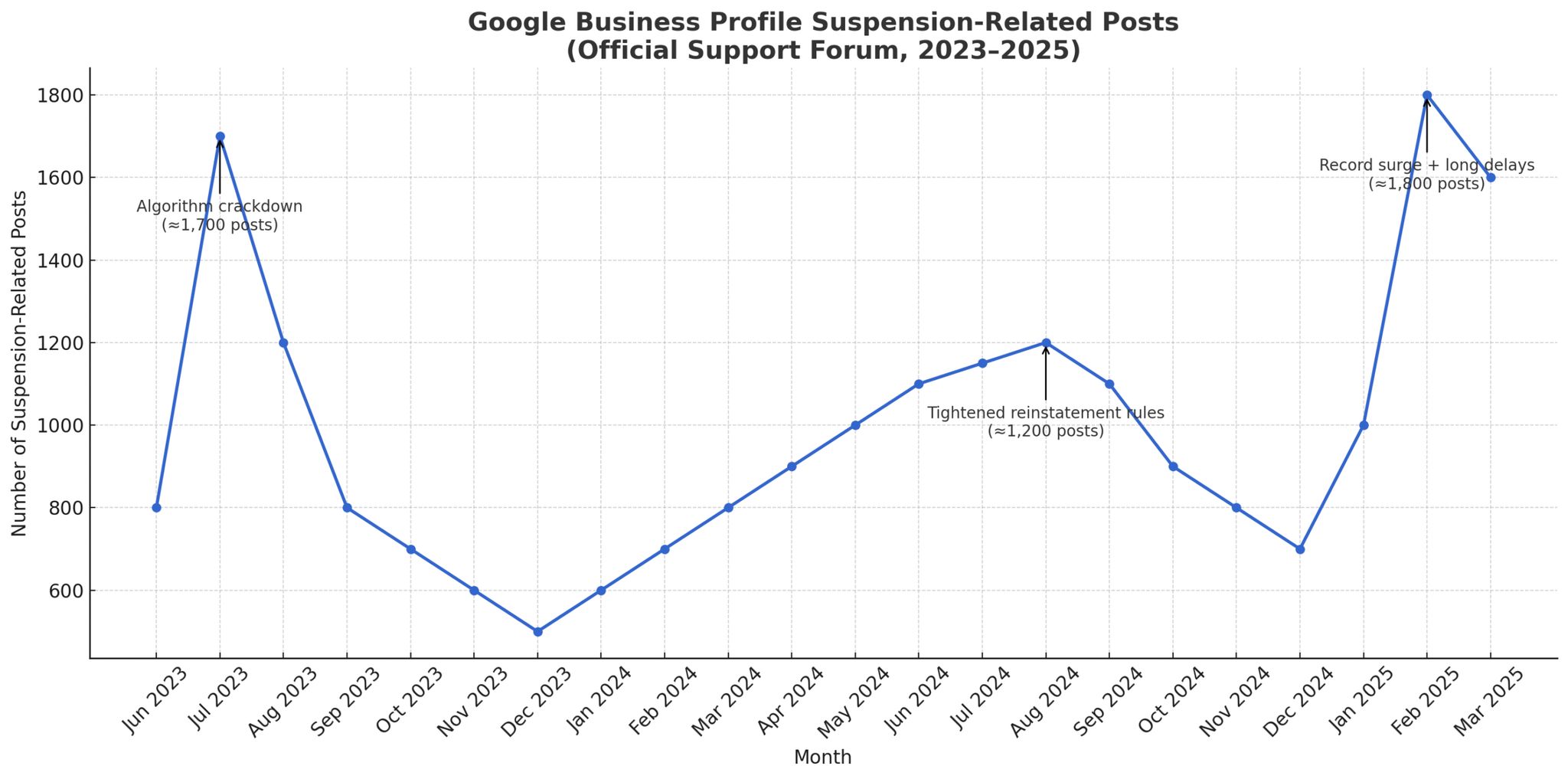
Google will not tell you which rule you broke. That is the maddening part, and it is also the part most people skip. Appealing without fixing the cause almost always fails, because Google checks the live listing when it reviews the appeal.
Run the profile against the usual triggers:
| Area | What gets profiles suspended |
|---|---|
| Business name | Added keywords, location words, or legal suffixes like PTY LTD that are not on your real signage |
| Address | PO box, virtual office, or coworking space used as a primary address |
| Address type | A service-area business set up as a storefront, or the reverse |
| Categories | Categories that do not match what the business actually does |
| Edits | Several significant fields changed at once, or changes from multiple users |
| Eligibility | A business model Google does not allow a profile for |
Go through it honestly and assume the cause is one of these. A business name change can trigger suspension on its own, so if you recently touched the name, start there. Fix every issue you find on the live profile before you go near the appeals tool.
Prepare your evidence
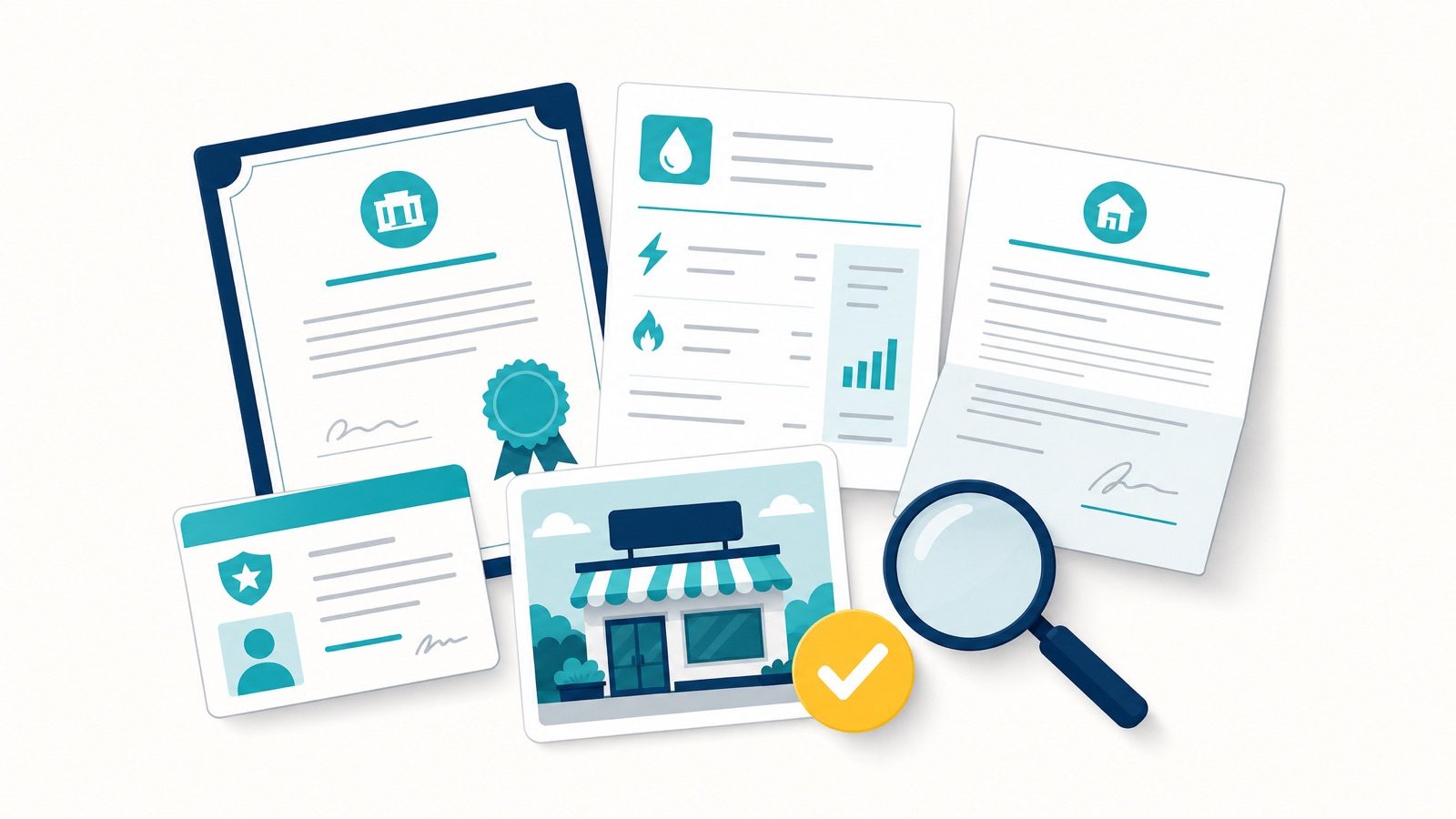
Google wants proof the business is real, legitimate, and located where the profile says it is. Pull this together before you start, because the appeal can only be submitted once. There is no second bite at the same appeal to add a document you forgot.
In Australia, appeals consistently want a short, specific list of documents, not a pile of paperwork. Stick to these:
- Your ASIC business name registration, from the Australian Business Register.
- A recent utility bill showing the same business name and address as the profile.
- Your industry licence or permit, if your trade requires one.
- A commercial lease, if you operate from a storefront customers visit.
- Photos: exterior signage and interior for a storefront, or branded vehicles, equipment and signage for a service-area business.
Skip the documents that feel relevant but are not what Google asks for here, such as an ABN extract, a tax invoice or BAS, personal photo ID, or public liability insurance. They add noise without strengthening the case.
Documents need to be recent, clearly readable, and match the profile exactly. If your utility bill says “Unit 4” and the profile says “Suite 4”, make them agree before you submit.
Name the files sensibly, including the Business Profile ID, so the reviewer can follow the evidence without guessing.
How to submit the appeal
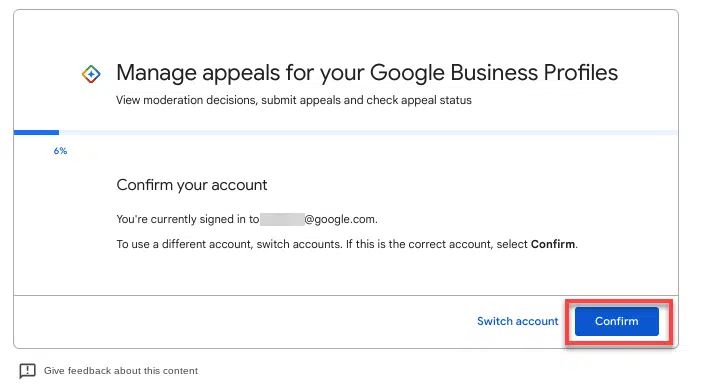
Use the official Google Business Profile appeals tool, signed into the account that owns the profile. Per Google’s Business Profile Help, the tool shows the restriction reason category and the relevant policy, and it is the only channel that reliably works now. Phone and social escalation are effectively dead for suspensions.
Google updated this flow in early July 2026 (Search Engine Roundtable), and the new version is more linear than the one most older guides describe. Two changes matter.
The bulk-reinstatement question now comes first. The appeal opens by asking whether you are reinstating a larger number of profiles, generally ten or more. Answer “No” and you drop straight into the normal single-location appeal. Answer “Yes” and you go to the spreadsheet-based bulk flow instead.
Evidence is now uploaded inside the appeal form itself. The old process pushed you to a separate evidence form after submitting, on a 60-minute timer that expired if you were slow. That separate timed form is gone. You now attach your documents in the appeal itself, through a single “Choose files” button that takes several files at once, rather than five separate upload fields.
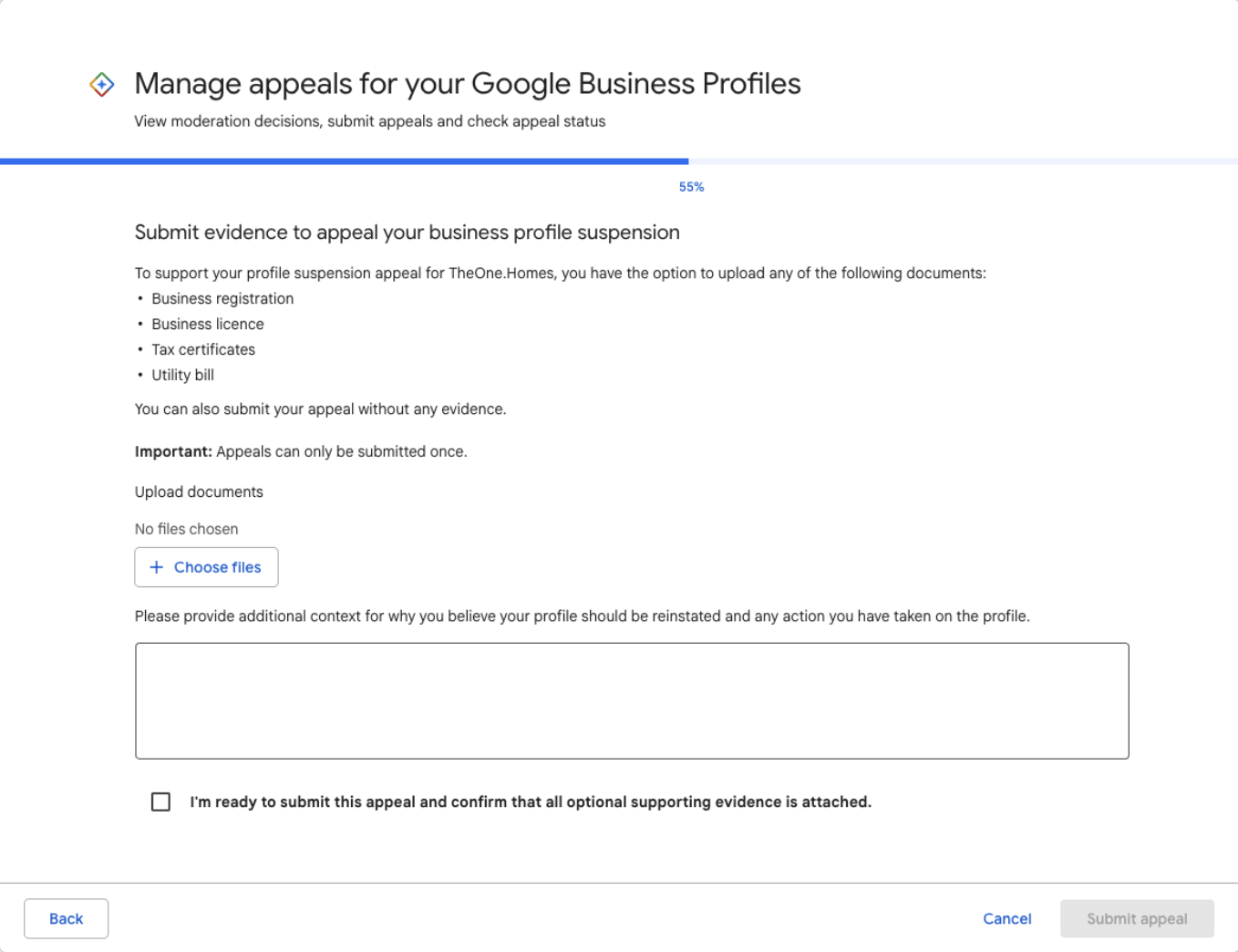
The trade-off is the line the form now states plainly: appeals can only be submitted once. There is no separate second window to fix a missing document, so the “prepare first” discipline matters more than ever, not less. Have your ASIC registration, utility bill, licence, lease and signage photos saved to one folder, named clearly, before you open the appeal.
Keep the written explanation short and factual: what was wrong, what you fixed, where the evidence is. A long, emotional appeal gets skimmed. A concise one that maps cleanly to the policy gets actioned.
Then tick the confirmation box and submit. Do not create a new profile while the appeal is under review. A duplicate rarely ranks, muddies the case, and can make reinstatement of the original harder. Submit your appeal once, properly, then wait.
First appeal vs additional review vs Product Expert
The single most expensive mistake is resubmitting the wrong form. Each stage is a different URL and a different job. Here is how they compare:
| Stage | Where it happens | When to use it | Who can submit |
|---|---|---|---|
| First appeal | Google Business Profile appeals tool | Straight after you have fixed the live profile | Owner or manager on the listing |
| Additional review | support.google.com/business/contact/local_appeals | After a denial, with stronger evidence than round one | Any owner or manager, not only the original filer |
| Product Expert escalation | Official Google Business Profile Help Community | Once both forms are exhausted | You, posting the case for an Expert to escalate |
Work down the table in order. Skipping a stage, or resubmitting a stage you have already used, is what gets an appeal auto-dismissed.
Re-verification and the video-verification trap
Reinstatement is not always a clean “approved” and done. Google often asks you to re-verify the business as part of clearing a suspension, frequently by video, and that step trips a lot of people up. Two patterns show up again and again:
- The verification itself is tangled with the suspension. Re-verification triggered by an address or name edit is a common path into a suspension in the first place, so the two problems arrive together.
- After one failed video attempt, the options dry up and you are left looking at “No more ways to verify”, with the standard flow offering nothing further.
If you hit that wall, do not keep retrying the same broken flow. Use “Contact support” inside the Business Profile to request a live video verification, a real-time call, rather than the standard recorded upload.
When you do record, follow Google’s rules: an unedited clip filmed live on your phone through the profile, showing your premises, signage and proof you operate there, with the business name on permanent signage matching the profile exactly, reviewed within up to five business days (Google).
How often the “no more ways to verify” dead end happens is owner-reported rather than a documented Google state, but it is common enough to plan for.
If your appeal is denied
A denial is not the end. Spamming the tool with repeat appeals is.
If you are knocked back, request an additional review and submit stronger evidence than the first round, not the same pack again. Add what was missing:
- Clearer documents.
- More proof of the physical operation.
- A tighter explanation of the fix.
The “additional review” is a separate form, not the same URL. This is where most owners go wrong on the GBP Help Community: they resubmit the original appeals tool with a tweaked file pack and get auto-dismissed. The additional-review path is its own URL at support.google.com/business/contact/local_appeals, reached via the link in your denial email. Any owner or manager on the listing can fill it out, it does not have to be the same person who filed the original appeal, and Search Engine Land’s writeup covers the form structure.
If you genuinely cannot identify the cause, get a second set of eyes on it before re-appealing, because each weak attempt makes the case harder to win. Once formal appeals are exhausted, the realistic last path is escalation through a Google Business Profile Product Expert in the official community. Nobody, us included, can guarantee reinstatement, and you should be wary of anyone who does.
Managing multiple suspended profiles
If you run many locations and several profiles are down, Google offers a bulk appeal flow for businesses with a larger number of profiles, generally ten or more, using a spreadsheet keyed by Business Profile ID. Since July 2026 the appeal asks whether this is a bulk reinstatement as its first question, so you are routed to this flow at the start rather than the end.
Keep a master tracking sheet: each profile’s ID, suspension reason, evidence submitted, and the status of the other profiles alongside it. Multi-location reinstatement is mostly an organisation problem, and the disorganised submissions are the ones that stall.
You’re back, but the rankings aren’t (yet)
Worth setting expectations, because reinstatement is the win condition most guides stop at, and then the phone is still quiet. Getting the profile live again is not the same as getting your rankings back.
Visibility often lags reinstatement, particularly for service-area businesses, where it commonly takes a couple of weeks before the listing settles back into the map. Reinstatement also seems to push the profile through a fresh review, which can briefly re-expose weak spots, thin categories, inconsistent citations, or a quiet review profile, that were tolerated before.
This is observed behaviour, not a documented Google policy, so treat the timeline as a pattern rather than a promise. The move is not to panic-edit the moment you are back. Let it settle, keep the profile active, and treat recovery as the front end of normal local SEO rather than a sign that something is still broken.
How to avoid it happening again
Reinstatement is the fire. Prevention is cheaper than the fire.
- Review Google’s profile policies each quarter, since enforcement shifts.
- Audit each live profile monthly for changes you did not make.
- Lock down user access. Remove former staff and old agencies from the profile.
- Keep your name, address, and phone consistent across your website, citations, and the profile.
- Prefer pushing changes as front-end suggested edits rather than heavy back-end edits, and watch what gets through. We cover this in our guide on monitoring suggested edits.
Stable profiles are usually the actively, carefully managed ones, not the ones left alone and hoped over.
When to get help
Do it yourself if the cause is obvious, the fix is simple, and the business is not losing meaningful revenue while it is down.
Get help when leads are bleeding with the profile offline, when the first appeal has already failed, or when you cannot work out what triggered it. A botched second appeal can entrench a suspension, so the cost of guessing is real.
That is what our GBP reinstatement service does day to day: find the actual trigger, fix the live profile, and submit one clean, evidence-backed appeal instead of a string of hopeful ones.
Across Australian reinstatements since early 2025, that method has recovered 230 of 234 profiles, a 98% success rate, for businesses across trades, clinics, and professional services.
One recent example: a Perth trades business was suspended after an address edit. We corrected the listing, submitted matching documentation, and it came back within days. Outcomes vary by case, which is exactly why the first appeal needs to be the strong one.
FAQ
How do I appeal my suspended Google Business Profile?
Fix the live profile first, then use the Google Business Profile appeals tool signed into the owning account. Confirm whether it is a profile suspension or an account restriction, correct the cause, attach your five documents in the appeal form, and submit once. Since July 2026 the evidence upload happens inside the appeal itself, so there is no separate timed form to chase.
How long does a Google Business Profile appeal take?
Typically several business days, and sometimes up to around two weeks, depending on the case and the queue. Additional reviews after a denial can be quicker, but there is no guaranteed timeframe, and anyone promising an exact number is guessing.
What happens if Google rejects your appeal?
You request an additional review at a separate URL with stronger evidence, not the same pack again. If that also fails, the practical escalation is a Google Business Profile Product Expert in the official community. Do not resubmit the original appeals tool repeatedly, it gets auto-dismissed.
How can I check the status of my appeal?
Google emails the outcome to the account that filed the appeal, and the restriction status updates in the Business Profile itself. There is no live progress bar, so watch for the email from Google rather than refreshing the tool.
How many times can I appeal?
You generally get a formal appeal and an additional review. After that, direct appeals usually close, and the practical escalation is a Google Business Profile Product Expert in the official community. This is why the first appeal should not be rushed.
Why won’t Google tell me why I was suspended?
Google only gives a broad restriction reason, not the specific fix. It is on you to audit the profile against the guidelines and correct everything before appealing. Working backwards from the common triggers is usually how you find it.
Can I just create a new profile instead?
No. A duplicate profile during a live suspension rarely ranks, can breach guidelines, and complicates reinstatement of the original. Fix and appeal the existing profile.
Do I lose my reviews if I am suspended?
Reviews are tied to the profile, not destroyed by a suspension. In most cases, when the profile is reinstated the reviews come back with it, and what you lose during the suspension is visibility and leads, not your review history.
The exception to watch for: occasionally Google reinstates a business as a brand-new profile rather than restoring the original, and reviews do not carry across. If that happens, do not start fresh. Give support both the old and new profile links plus examples of the missing reviews and ask them to restore the original.
The bottom line
A suspension is recoverable, but it rewards method over panic. Confirm what is actually restricted, fix the live profile, prepare evidence that matches it exactly, and appeal once with a clear, factual case. Then protect the profile so you are not back here in six months.
If your profile is down and the leads are going with it, or your first appeal has already been refused, book a strategy call, start the onboarding form, or look at our GBP reinstatement service. Calm, methodical, one strong appeal, and honest local SEO advice on keeping it stable afterwards.